
Traditional lectures leave students passively taking notes while struggling to stay awake. The flipped classroom model solves this by moving content delivery to homework time and bringing active learning into the classroom. In this guide, you will learn exactly what is the flipped classroom model, how it transforms teaching and learning, and practical steps to implement it in 2026.
Whether you are a teacher looking to increase student engagement or a student trying to understand why your professor swapped lectures for videos, this guide covers everything you need to know about flipped learning.
Table of Contents
What Is the Flipped Classroom Model?
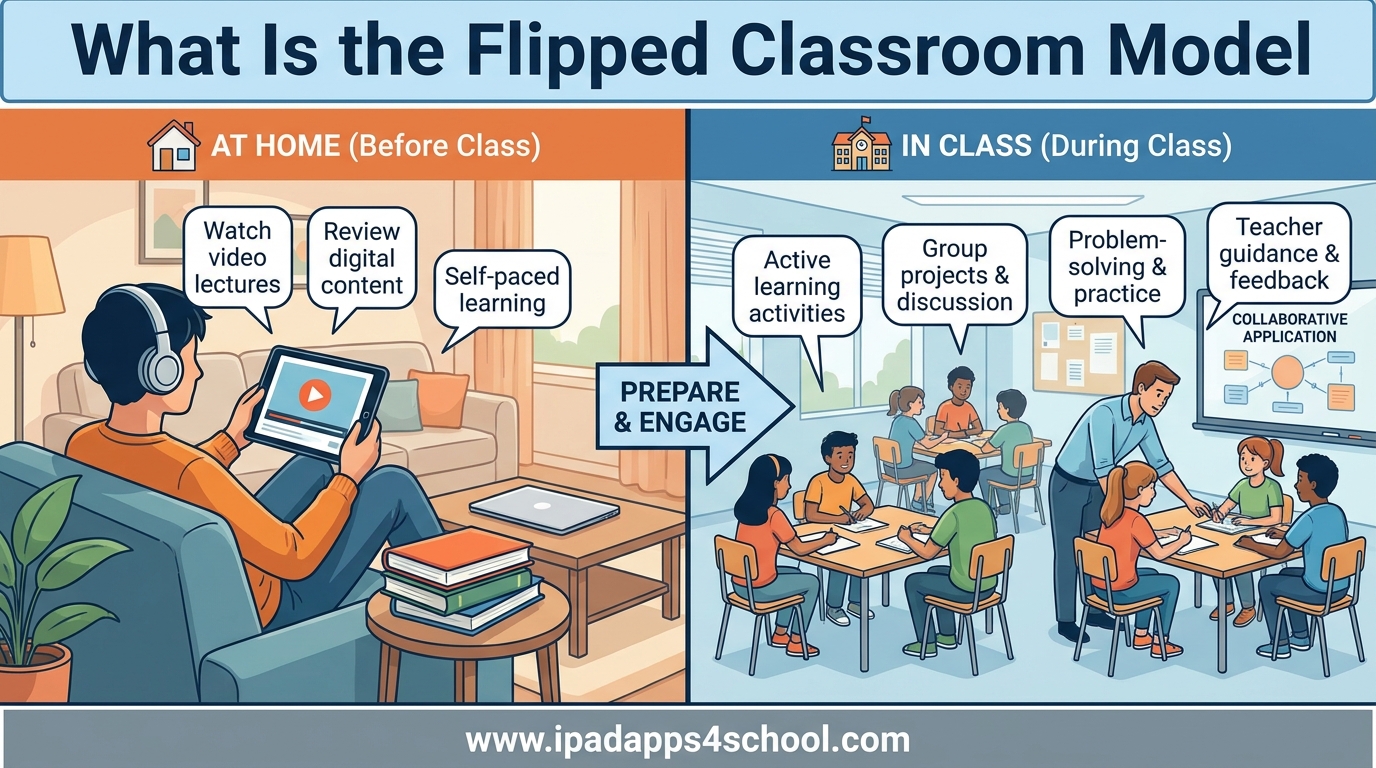
A flipped classroom is an instructional strategy that reverses the traditional learning environment. Students learn new content at home through video lectures or readings, then use class time for interactive activities, problem-solving, and hands-on application with teacher guidance.
Instead of lecturing during class and assigning homework, teachers record their lessons for students to watch before coming to class. This inversion allows classroom time to focus on the difficult part of learning: applying knowledge, asking questions, and collaborating with peers.
The concept emerged from the work of Jonathan Bergmann and Aaron Sams, two Colorado teachers who started recording their chemistry lessons in 2007. They noticed students who missed class struggled to catch up, so they began posting lectures online. Soon they realized all students benefited from being able to pause, rewind, and rewatch explanations at their own pace.
The Four Pillars of Flipped Learning
The Flipped Learning Network established four pillars that define true flipped learning:
- Flexible Environment – Flipped learning allows students to choose when and where they learn. Teachers create flexible spaces where students work in groups, alone, or one-on-one with the instructor.
- Learning Culture – The model shifts instruction from teacher-centered to student-centered. Students take responsibility for their learning while teachers act as coaches and facilitators.
- Intentional Content – Teachers think carefully about what content works best in video format versus what needs face-to-face interaction. Not everything belongs in a video.
- Professional Educator – The teacher remains essential. Flipped learning requires more planning, not less. Teachers must create meaningful in-class activities and provide continuous feedback.
How Does a Flipped Classroom Work?
Understanding what is the flipped classroom model requires seeing the actual flow of a flipped lesson. Here is how a typical flipped classroom operates from start to finish.
Before Class: Pre-Class Preparation
Students receive their first exposure to new material at home through video lectures, readings, or interactive modules. These pre-class materials typically last 10 to 15 minutes, replacing what would have been a 45-minute lecture.
Students watch videos at their own pace, pausing to take notes or rewatching sections they do not understand. Some teachers require students to complete a short quiz or submit questions before class to ensure accountability.
During Class: Active Application
Class time transforms from passive listening to active engagement. The teacher begins with a brief Q&A session to address common questions from the pre-class material. Then students dive into activities like problem-solving exercises, group projects, debates, or hands-on experiments.
The teacher circulates the room, providing individualized help to students who struggled with the video and challenging those who understood quickly. This personalized attention is impossible during traditional lectures but becomes the focus in a flipped classroom.
After Class: Consolidation
Students reflect on what they learned and complete any remaining work. Some teachers use online discussion boards for follow-up questions. Others assign additional practice problems that build on the in-class activities.
Traditional vs Flipped Classroom: Key Differences
The shift from traditional to flipped learning changes every aspect of the classroom experience. Here is how the two models compare:
| Aspect | Traditional Classroom | Flipped Classroom |
|---|---|---|
| Teacher Role | Lectures and delivers content | Facilitates and guides learning |
| Student Role | Passive listener and note-taker | Active participant and problem-solver |
| Homework | Practice problems and reading | Watch lectures and learn content |
| Class Time | Listen to lectures | Apply concepts with help |
| Pace | Teacher sets the speed | Student controls the pace at home |
| Support | Office hours or email | Immediate help during class |
| Technology | Optional supplement | Required for content delivery |
| Learning Style | One-size-fits-all lecture | Differentiated instruction |
The most significant change happens in the teacher-student relationship. Instead of being the “sage on the stage” delivering information, the teacher becomes the “guide on the side” facilitating understanding.
Benefits of the Flipped Classroom Model
Research consistently shows that flipped learning improves educational outcomes when implemented well. Here are the key benefits for both students and teachers.
Benefits for Students
- Self-paced learning – Students can pause, rewind, and rewatch video content until they understand it. Fast learners move ahead while others take the time they need.
- Increased engagement – Class time becomes interactive and social. Students report enjoying the collaborative problem-solving more than passive lectures.
- Immediate help – When students get stuck on homework, they often have no one to ask. In a flipped classroom, the teacher is present during the difficult application phase.
- Development of higher-order thinking – Class time focuses on analysis, evaluation, and creation rather than just memorization and comprehension.
- Better preparation for assessments – Working through problems with teacher guidance builds confidence and competence before tests.
Benefits for Teachers
- More time for individualized instruction – Teachers can identify struggling students quickly and provide one-on-one support.
- Better understanding of student comprehension – Watching students work reveals misconceptions that would never surface during a lecture.
- Improved student relationships – The collaborative environment builds rapport and trust between teachers and students.
- Reduced repetitive explanations – Record once, use repeatedly. Teachers stop answering the same question fifty times.
- Flexibility for absent students – Students who miss class can catch up easily by watching the video and reviewing materials.
Research Evidence
A meta-analysis published in the Journal of Educational Technology and Society found that flipped classrooms showed significant positive effects on student learning compared to traditional classrooms. The greatest benefits appeared in STEM subjects, particularly mathematics and science courses.
However, research also shows that flipped learning works best when teachers receive proper training and students understand how to learn in this environment. Simply recording lectures and calling it “flipped” produces disappointing results.
Challenges and Solutions
Despite its benefits, the flipped classroom model faces significant challenges. Understanding these obstacles and how to overcome them separates successful implementations from failed experiments.
Common Student Concerns
Forum discussions reveal that students often express frustration with flipped classrooms. The most common complaint is feeling like they are “teaching themselves” without proper guidance from the instructor. Students also report that watching videos feels like double homework: first the video, then the in-class work.
Some students struggle with the self-discipline required to watch videos before class. Without accountability measures, they arrive unprepared and cannot participate in group activities. This creates tension with classmates who did the preparation.
Technology access presents another barrier. Students without reliable internet or devices struggle to complete pre-class work. Others find long video lectures difficult to focus on, especially those with ADHD or other learning differences.
Solutions That Work
- Keep videos short and focused – Aim for 6 to 12 minutes per video. Break complex topics into multiple short segments rather than one long lecture.
- Build in accountability – Use entrance tickets, brief quizzes, or note checks to ensure students complete pre-class work.
- Provide multiple formats – Offer videos with captions, transcripts, and alternative readings for students with different learning needs.
- Explain the why – Help students understand how the flipped model benefits them. Resistance drops when students see the purpose.
- Support struggling students – Identify students who arrive unprepared and provide alternative ways to catch up without penalizing them.
Teacher Challenges
Teachers face their own obstacles. Creating quality video content requires time and technical skills many educators lack. Designing meaningful in-class activities demands more preparation than traditional lectures.
The shift also requires giving up control. Teachers must trust that students will engage with content independently and be comfortable with the noise and chaos of active learning.
How to Implement a Flipped Classroom: 7 Steps
Starting with a fully flipped course overwhelms most teachers. Instead, follow these seven steps to gradually implement the flipped classroom model in your teaching.
Step 1: Plan Your In-Class Activities First
Before creating any videos, design what students will do during class time. Ask yourself what activities would benefit most from your presence and guidance. These activities determine what content students need to learn beforehand.
Step 2: Choose or Create Pre-Class Materials
Decide whether to record your own videos, use existing resources, or combine both. Many teachers start with curated videos from Khan Academy, YouTube, or publisher resources while building their own content over time.
Step 3: Start Small with One Lesson
Flip just one lesson or one week of content. Learn from this pilot before committing your entire course. This approach lets you refine your process and identify problems on a small scale.
Step 4: Communicate with Students
Explain what you are doing and why. Show students how the flipped model helps them learn better and succeed in your course. Transparency reduces resistance and builds buy-in.
Step 5: Set Clear Accountability Measures
Students need motivation to complete pre-class work. Low-stakes quizzes, required discussion posts, or entrance tickets work well. Make the work meaningful but not punitive.
Step 6: Monitor and Adjust
Check in regularly with students about their experience. Are videos the right length? Are in-class activities working? Be willing to pivot based on feedback.
Step 7: Reflect and Improve
After each flipped unit, evaluate what worked and what did not. Update your videos based on student questions. Refine your activities based on engagement levels. Flipped learning is a continuous improvement process.
iPad Apps and Tools for Flipped Learning
Technology enables flipped learning, and iPad devices offer powerful tools for both creating and consuming flipped content. Here are the best apps for implementing a flipped classroom model on iPad.
Video Creation Apps
- Explain Everything – The gold standard for creating instructional videos on iPad. Record your screen while annotating, adding voiceover, and inserting multimedia. Exports directly to YouTube or your learning management system.
- Doceri – Turn your iPad into an interactive whiteboard. Record lessons while writing, drawing, and annotating over images. Includes remote desktop control for PC or Mac.
- ScreenCastify (iPad version) – Simple screen recording with annotation tools. Good for quick tutorials and walkthroughs.
- Clips – Apple’s free app for creating short, engaging videos with captions, stickers, and animated titles. Perfect for brief explanations.
Content Delivery Platforms
- Edpuzzle – Import any video and add quizzes, comments, and voiceovers. See exactly which students watched and how they answered questions. Essential for accountability.
- Nearpod – Combine slides, video, and interactive activities in one lesson. Students join on their iPads and work through content at their own pace while you monitor progress.
- Google Classroom – Organize and distribute your flipped content. Post videos, assignments, and discussion questions in one place.
- Schoology or Canvas – Full learning management systems with video hosting, assignment tracking, and gradebook integration.
Assessment and Interaction Tools
- Flipgrid – Students record video responses to prompts. Creates asynchronous video discussions that extend class conversations.
- Kahoot or Quizizz – Quick formative assessments to check understanding before and after video viewing.
- Pear Deck – Interactive presentations where students respond on their iPads during class. Perfect for checking comprehension after pre-class videos.
- Padlet – Digital bulletin boards where students post questions, reflections, or resources related to video content.
Student-Facing Apps
- YouTube – Most flipped content lives here. Students subscribe to teacher channels and playlists for easy access.
- Notability or GoodNotes – Take notes while watching videos. Split screen with the video and note-taking app for active learning.
- Voice Memos – Students can record questions or reflections about video content to share with teachers.
Many of these apps offer free versions sufficient for getting started. As your flipped classroom grows, paid features provide additional functionality worth the investment.
Frequently Asked Questions
Can you explain the flipped classroom model?
The flipped classroom model is an instructional strategy that reverses traditional teaching. Students learn new content at home through video lectures or readings, then use class time for interactive activities, problem-solving, and application with teacher guidance. This approach moves passive learning to homework and brings active learning into the classroom where teachers can provide immediate help.
What are the 4 pillars of flipped classroom?
The four pillars of flipped learning are: 1) Flexible Environment – allowing students to choose when and where they learn, 2) Learning Culture – shifting from teacher-centered to student-centered instruction, 3) Intentional Content – carefully selecting what content works best in video format versus face-to-face interaction, and 4) Professional Educator – teachers act as coaches and facilitators rather than lecturers.
What is an example of a flipped classroom method?
A typical flipped classroom works like this: Before class, students watch a 10-minute video explaining a new concept and take notes. At the start of class, the teacher answers questions for 5 minutes. Then students work in groups on practice problems while the teacher circulates providing help. Finally, students complete an exit ticket to check understanding. The teacher uses class time for application rather than content delivery.
What are the 7 steps to flipping your classroom?
The seven steps to flipping your classroom are: 1) Plan in-class activities first to determine what content students need beforehand, 2) Choose or create pre-class materials like videos or readings, 3) Start small with one lesson or unit as a pilot, 4) Communicate with students about the change and its benefits, 5) Set accountability measures like entrance tickets or brief quizzes, 6) Monitor and adjust based on student feedback, and 7) Reflect and improve continuously as you gain experience.
Do students like flipped classrooms?
Student opinions on flipped classrooms vary. Many appreciate the ability to learn at their own pace, pause and rewatch videos, and receive immediate help during class activities. However, some students dislike the increased responsibility and feel they are teaching themselves without proper guidance. Success depends on clear communication, quality videos, meaningful in-class activities, and appropriate accountability measures. Students generally respond positively when they understand the benefits and receive support.
What technology do I need for a flipped classroom?
At minimum, you need a device to record videos (smartphone, tablet, or computer with camera), a platform to host videos (YouTube, Google Drive, or learning management system), and student access to devices and internet for viewing. For iPad specifically, apps like Explain Everything or Doceri work well for video creation. Many teachers also use Edpuzzle for adding quizzes to videos and Google Classroom for organization. Students need any device capable of playing videos and completing online assignments.
How long should flipped classroom videos be?
Research and student feedback suggest keeping videos between 6 to 12 minutes. Shorter videos maintain attention better and allow students to focus on one concept at a time. If your lesson requires more time, break it into multiple short videos rather than one long lecture. Students can watch one video, process the information, then continue to the next. This approach also makes it easier for students to rewatch specific sections they find challenging.
How do I handle students who do not watch the videos?
Several strategies help ensure students complete pre-class work. First, build in accountability through entrance tickets, brief online quizzes, or notes checks at the start of class. Second, make the videos engaging and concise so students want to watch them. Third, provide alternative ways to learn the content for students with technology barriers. Fourth, explain why the flipped model matters so students understand the value. Finally, design class activities so that unprepared students cannot simply copy from peers, but also cannot participate fully without doing the work.
Conclusion
The flipped classroom model transforms education by moving content delivery to homework and bringing active learning into the classroom. This approach gives students control over their learning pace while providing teachers time to offer personalized support where it matters most.
Success with flipped learning requires more than just recording videos. Teachers must design meaningful in-class activities, communicate the benefits to students, build in accountability, and remain flexible as they refine their approach. Students must adapt to taking more responsibility for their initial learning while gaining the benefit of immediate help during application.
Whether you teach kindergarten or college courses, whether you use iPad apps or desktop software, the principles remain the same. Start small, learn from feedback, and continuously improve. The flipped classroom model offers a powerful path toward more engaging, effective, and student-centered education in 2026 and beyond.