
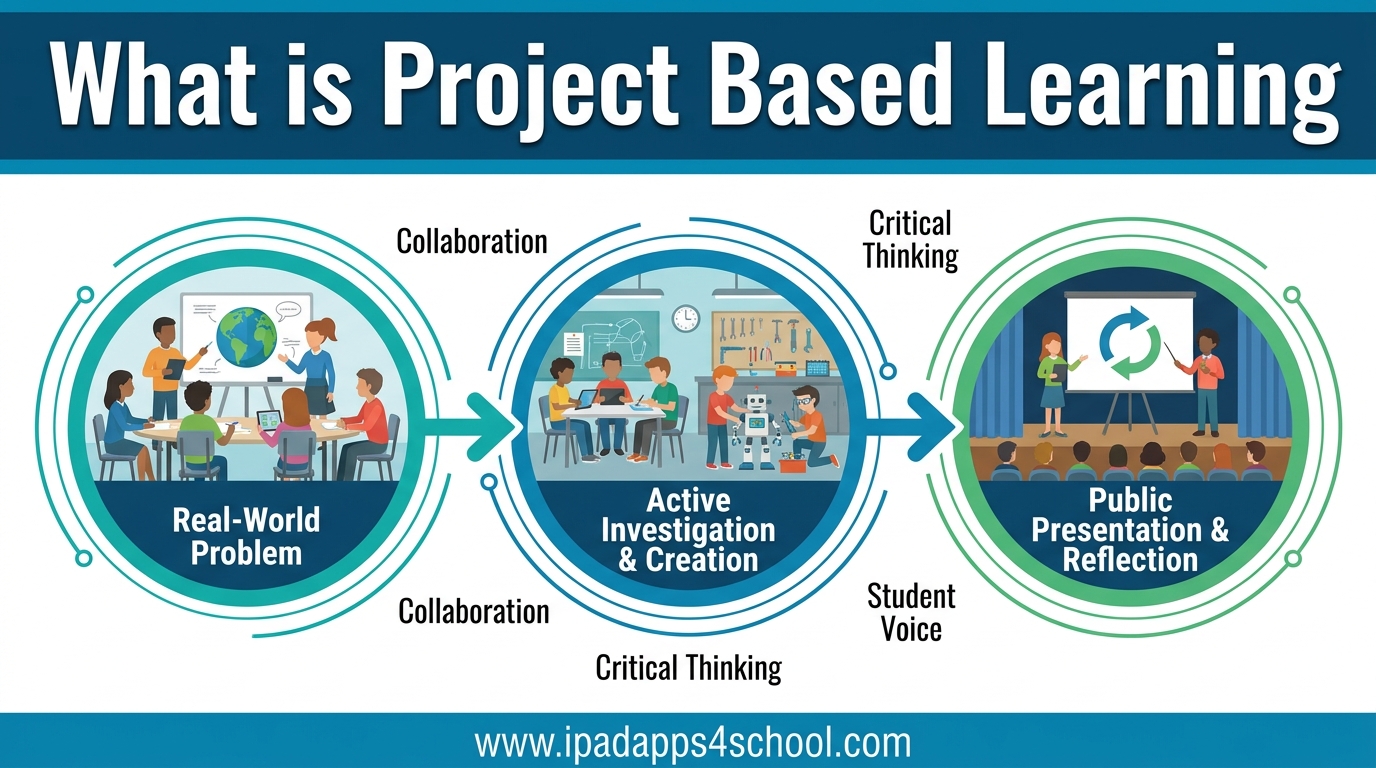
What is project based learning? It is a teaching method where students gain knowledge and skills by working for an extended period to investigate and respond to an authentic, engaging, and complex question, problem, or challenge. I have seen this approach transform classrooms over my years of reviewing educational technology.
Unlike traditional instruction where teachers deliver information and students passively receive it, project based learning flips the script. Students become active investigators. They ask questions, conduct research, collaborate with peers, and create real products that demonstrate their learning.
At iPad Apps For School, we have noticed a powerful connection between PBL and mobile technology. iPads provide the perfect toolkit for students to research, collaborate, create, and share their projects. The right apps can make the difference between a good project and an extraordinary one.
In this guide, I will walk you through everything you need to know about project based learning. You will learn the essential elements, understand how it differs from traditional projects, discover the benefits backed by research, and find specific iPad apps that support each phase of the PBL process.
Table of Contents
What is Project Based Learning?
Project Based Learning (PBL) is a student-centered teaching method where learning happens through the process of completing meaningful projects. The Buck Institute for Education (PBLWorks) defines it as “a teaching method in which students learn by actively engaging in real-world and personally meaningful projects.”
The concept has roots going back over a century. Educational philosopher John Dewey advocated for “learning by doing” in the early 1900s. William Heard Kilpatrick expanded these ideas with his “Project Method” in 1918. What we call PBL today builds on these foundations while incorporating modern research about how students learn best.
Here are the core characteristics that define true project based learning:
- Projects center on challenging problems or questions that drive inquiry
- Students engage in sustained inquiry over days, weeks, or even months
- Learning is authentic and connected to real-world contexts
- Students have voice and choice in how they work and what they create
- Projects include time for reflection, critique, and revision
- The final product is shared with a public audience beyond the classroom
When implemented well, PBL creates what educators call “deeper learning.” Students do not just memorize facts for a test. They understand concepts deeply enough to apply them to new situations. They develop the critical thinking, collaboration, and communication skills they will need throughout their lives.
The 7 Essential Elements of Project Based Learning
PBLWorks has identified seven essential elements that distinguish high-quality project based learning from simple “doing projects.” Understanding these elements helps teachers design effective PBL experiences and helps parents recognize quality PBL when they see it.
1. Challenging Problem or Question
Every PBL unit begins with a driving question or challenge. This is not a question with a simple, Google-able answer. It is open-ended, complex, and intellectually engaging. A good driving question sparks curiosity and sustains inquiry.
For example, instead of asking “What causes climate change?” (which has a factual answer), a driving question might be “How can our school reduce its carbon footprint by 20% in one year?” This question requires investigation, analysis, and creative problem-solving.
iPad apps like Padlet or Jamboard help students brainstorm and refine driving questions collaboratively. Students can post sticky notes, organize ideas, and build on each other’s thinking visually.
2. Sustained Inquiry
True learning takes time. PBL units typically last several days to several weeks. This extended timeframe allows students to dig deep, encounter obstacles, adjust their approaches, and develop real expertise.
Sustained inquiry involves asking multiple questions, finding and evaluating sources, and synthesizing information. It is the opposite of surface-level research. Students learn to distinguish reliable sources from questionable ones, a skill essential in our information-rich world.
For research phases, apps like Epic! provide age-appropriate articles and ebooks. Newsela offers current events at adjustable reading levels. Kiddle serves as a safe search engine designed for student research.
3. Authenticity
The best PBL projects connect to real-world issues, careers, or contexts that matter to students. Authenticity can mean addressing real community problems, using real-world tools and methods, or creating products for actual audiences.
When students see the relevance of their work, engagement soars. A project about designing a garden for the school grounds feels more meaningful than a hypothetical garden design on paper. Students interviewing actual community members learn more than those reading about communities in textbooks.
Apps like Flipgrid let students record video interviews with experts anywhere in the world. Skype or Zoom enable virtual field trips and guest speakers. GarageBand helps students create podcasts that share community stories with authentic audiences.
4. Student Voice and Choice
PBL gives students meaningful opportunities to make decisions about their projects. This might include choosing research topics, selecting creation formats, determining team roles, or deciding how to present findings.
Voice and choice increases ownership and motivation. When students care about their projects because they helped design them, they persist through challenges. They develop self-direction and learn to manage their own learning, skills critical for college and career success.
Creative apps like iMovie, Clips, Adobe Spark, and Canva give students options for how to present their learning. Some might create documentary videos while others design infographics or build interactive presentations. The iPad supports diverse expression formats.
5. Reflection
Throughout the project, students reflect on what they are learning, how they are learning it, and why it matters. Reflection helps students internalize their learning and recognize their growth.
Teachers build reflection into the project timeline through journals, discussions, and structured thinking routines. Students might reflect on their collaboration skills, their problem-solving strategies, or how their understanding of a concept has evolved.
Reflection apps like Seesaw and Flipgrid create digital portfolios where students document their learning journey. Notes or Notability support learning journals. Explain Everything lets students create video reflections explaining their thinking.
6. Critique and Revision
High-quality work requires feedback and iteration. PBL includes structured opportunities for critique, whether from teachers, peers, or outside experts. Students learn to give and receive constructive feedback, then use it to improve their work.
This process mirrors how professionals work in the real world. Architects revise designs based on client feedback. Writers edit drafts based on editor comments. Scientists refine experiments based on peer review. Students learning this process in school develop valuable workplace skills.
Collaboration apps like Google Docs, Pages, and Keynote support real-time feedback with comments and suggested edits. Procreate for artists or GarageBand for musicians allows multiple revision cycles of creative work.
7. Public Product
PBL culminates in a public product shared with an audience beyond the classroom. This might be a presentation to parents, a website for the community, or a proposal to actual decision-makers.
Knowing their work will be public raises the stakes. Students put more effort into projects when real people will see them. The public product also allows students to contribute meaningfully to the world, not just complete assignments for grades.
Sharing apps like Book Creator let students publish ebooks. Wix or Weebly enable website creation. YouTube (with proper permissions and privacy settings) allows video sharing. Social media platforms can amplify student voices to authentic audiences.
How PBL Differs from Traditional Projects?
Many teachers assign projects. Students make posters, build models, or give presentations. But these traditional projects differ significantly from true project based learning.
PBLWorks uses a helpful metaphor: traditional projects are the “dessert” while PBL is the “main course.” In traditional instruction, projects come after the learning. Students learn content through lectures and readings, then demonstrate that learning through a project. The project shows what they already learned.
In PBL, the project IS the learning. Students learn the content BY working on the project. The inquiry process itself builds knowledge and skills. The project is not an assessment of prior learning but the vehicle for new learning.
Here is how the two approaches differ:
Traditional Projects:
- Often assigned individually
- Follow a predetermined format
- Focus on creating a product
- Audience is typically just the teacher
- Completed in a few days
- All students produce similar work
Project Based Learning:
- Usually involves collaboration
- Allows student voice in process and product
- Focuses on the learning process as much as the product
- Audience extends beyond the classroom
- Extends over days or weeks
- Students produce diverse, original work
Both approaches have value. Traditional projects work well for practicing skills or demonstrating mastery. PBL works better for introducing new concepts through inquiry and developing 21st-century skills.
The Four C’s of Project Based Learning
Project based learning naturally develops what educators call the “Four C’s” — critical thinking, communication, collaboration, and creativity. These skills are essential for success in college, career, and citizenship in the modern world.
Critical Thinking
PBL requires students to analyze complex problems, evaluate information, and make decisions. They must think deeply about their driving questions and figure out how to answer them. This goes far beyond memorization.
When students design solutions to real problems, they encounter ambiguity. There is no single right answer in the back of the book. They must weigh evidence, consider multiple perspectives, and justify their choices with reasoning.
Apps like Popplet or MindNode help students organize thinking visually. Numbers or Excel support data analysis. Swift Playgrounds introduces computational thinking and logical reasoning.
Communication
PBL gives students constant practice communicating their ideas. They write proposals, present findings, create videos, and document their learning. They must communicate clearly to authentic audiences who need to understand their work.
Strong communication involves more than writing essays. Students learn to adapt their message for different audiences, use visual communication effectively, and leverage technology to reach wider audiences.
iPad apps excel at supporting communication. Clips and iMovie create video content. Keynote builds presentations. Pages and Google Docs handle written communication. Adobe Spark produces graphics and web pages.
Collaboration
Most PBL projects involve teamwork. Students must coordinate with peers, divide responsibilities, resolve conflicts, and combine individual contributions into cohesive products. These are the same collaboration skills required in modern workplaces.
Collaboration does not come naturally to all students. PBL provides authentic contexts for learning these skills. Teachers can scaffold collaboration through structured protocols, team contracts, and reflection on group dynamics.
Collaboration apps like Google Workspace, Microsoft Teams, or Slack (education versions) support teamwork. Padlet enables group brainstorming. Flipgrid facilitates asynchronous video discussions. Shared Notes in iOS allows real-time collaborative writing.
Creativity
PBL unleashes student creativity. When students have voice and choice in their projects, they bring unique perspectives and innovative approaches. They are not filling in worksheets but designing original solutions to real problems.
Creativity involves generating ideas, taking risks, and iterating on designs. PBL creates safe spaces for creative experimentation. Students learn that first attempts often fail and that revision leads to better results.
The iPad is a creativity powerhouse. Procreate and Adobe Fresco enable digital art. GarageBand and Logic Pro support music creation. iMovie and Clips handle video production. Tinkercad introduces 3D design. Swift Playgrounds teaches creative coding.
Benefits of Project Based Learning
Research consistently supports the effectiveness of project based learning. Studies show that PBL improves student outcomes across multiple dimensions. Here is what the research reveals.
Deeper Learning and Better Retention
Students in PBL classrooms demonstrate deeper understanding of content. They remember what they learn longer because they learned it through active engagement rather than passive listening. A study by the University of Michigan found that PBL students outperformed traditional instruction students on assessments measuring conceptual understanding.
When students apply knowledge to solve problems, they develop more robust mental models. They see how concepts connect to real situations. This makes the learning stick.
Increased Engagement and Motivation
PBL taps into intrinsic motivation. Students work harder when they care about their projects. A study in the Journal of Educational Psychology found that PBL increased student engagement, particularly for students who were previously disengaged from school.
Choice plays a big role in motivation. When students can pursue topics they find interesting and present work in formats they enjoy, their motivation increases. The iPad supports this by offering multiple ways to express learning.
Development of Real-World Skills
PBL develops the skills employers value most. According to the World Economic Forum, critical thinking, creativity, and collaboration are among the top skills needed for the workforce of 2026. PBL builds these skills deliberately.
Students also learn project management, research methods, and communication skills. They practice the same workflows professionals use. This preparation for real-world work gives PBL graduates an advantage.
Benefits for Different Learners
Project based learning can be particularly effective for students who struggle with traditional instruction. Research shows that PBL benefits students with ADHD by providing structure while allowing movement and hands-on engagement. The authentic contexts help students see the purpose behind learning.
PBL also supports English language learners. The collaborative nature provides peer support, and the visual and hands-on elements make content more accessible. Students can demonstrate understanding through products rather than just verbal or written explanations.
For students with learning differences, the iPad’s accessibility features combined with PBL’s flexibility create powerful learning environments. Text-to-speech, speech-to-text, and visual supports can be integrated seamlessly into project work.
Improved Academic Outcomes
Multiple large-scale studies show that PBL improves academic achievement. Research by the Lucas Education Research found that students in PBL classrooms performed as well or better on standardized tests than students in traditional classrooms, while also developing stronger problem-solving skills.
A study of Advanced Placement courses found that PBL approaches improved AP exam scores compared to traditional AP instruction. Students learned the content deeply enough to perform well on demanding assessments while also building additional skills.
iPad Apps That Enable Project Based Learning
Technology amplifies project based learning. iPads provide portable, powerful tools that support every phase of the PBL process. Here are the best apps for implementing PBL in your classroom.
Apps for Research and Inquiry
Every PBL project begins with questions. Students need tools to find, evaluate, and organize information. These apps support the research phase.
Epic! offers an enormous digital library with thousands of books, articles, and videos. The reading levels adjust to individual students, making research accessible for everyone. Students can create collections for their projects.
Newsela provides current events articles at five reading levels. Students can research real-world issues relevant to their projects. The built-in assessments help teachers track comprehension.
Kiddle serves as a visual search engine designed for kids. Results are filtered for safety and relevance. The image search helps students find visual references for their projects.
Evernote or OneNote organize research notes. Students can clip web articles, add images, record audio notes, and tag everything for easy retrieval. These digital notebooks follow students throughout long projects.
Apps for Collaboration
PBL is typically a team sport. These apps help students work together effectively.
Google Workspace (Docs, Sheets, Slides) enables real-time collaboration. Multiple students can edit simultaneously, leave comments, and track changes. The iPad apps work seamlessly with the desktop versions.
Padlet creates digital bulletin boards for brainstorming and organizing ideas. Students post sticky notes, images, links, and videos. The visual layout helps teams see connections between ideas.
Flipgrid facilitates video discussions. Students record short videos responding to prompts or sharing progress updates. Teams can maintain asynchronous communication even when working at different times.
Microsoft Teams or Slack (education versions) provide team communication platforms. Students can create channels for different aspects of their projects, share files, and coordinate their work.
Apps for Creation and Public Product
The final product demonstrates learning. These creation apps let students express their understanding in diverse formats.
iMovie and Clips handle video production. Students create documentaries, newscasts, tutorials, or story videos. The iPad cameras capture high-quality footage, and the editing tools are intuitive enough for elementary students yet powerful enough for high school projects.
GarageBand enables podcast and music creation. Students can record interviews, create soundtracks, or produce full podcasts. The built-in instruments and loops make music creation accessible to everyone.
Adobe Spark creates graphics, web pages, and video stories quickly. The templates help students produce professional-looking work. This is perfect for public-facing projects that need polish.
Book Creator lets students publish multimedia ebooks. They combine text, images, audio, and video into digital books that can be shared with authentic audiences.
Keynote builds presentations with stunning animations. The “Magic Move” feature creates smooth transitions. Presentations can include interactive elements, videos, and live data.
Procreate and Adobe Fresco enable digital art creation. Students can illustrate their projects, create infographics, or design visual elements. The Apple Pencil makes the iPad feel like paper.
Apps for Documentation and Reflection
Learning happens through reflection. These apps help students document their journey and think about their learning.
Seesaw creates digital portfolios where students document their learning. They can upload photos, videos, drawings, and notes. Parents and teachers can view and comment on the portfolios.
Notability and GoodNotes support handwritten notes, sketches, and annotations. Students can keep project journals, annotate research articles, or brainstorm ideas naturally.
Explain Everything is an interactive whiteboard for creating video explanations. Students can record themselves thinking through problems, explaining concepts, or presenting findings. These “explanation videos” make thinking visible.
Camera and Photos document the project journey. Students photograph work in progress, record interviews, or capture video of experiments. The built-in editing tools handle basic adjustments.
Getting Started with PBL in Your Classroom
Implementing project based learning for the first time can feel overwhelming. I have talked with many teachers who worry about curriculum coverage, assessment, and classroom management. Here is a practical roadmap for getting started.
Step 1: Choose a Meaningful Topic
Start with your curriculum standards. Look for standards that naturally lend themselves to inquiry and real-world application. Science and social studies topics often work well, but PBL works in any subject including math and language arts.
Consider your students’ interests. What issues do they care about? What problems do they see in their community? Projects connected to student interests generate more engagement. A project about the local water quality means more to students than a generic water cycle project.
Begin with one project. Do not try to convert your entire curriculum at once. Pick a unit that already has some hands-on elements and extend it into a full PBL experience. Learn from this first project before expanding.
Step 2: Craft a Driving Question
The driving question sets the tone for the entire project. A good driving question is:
- Open-ended with no single right answer
- Challenging and intellectually engaging
- Authentic and connected to the real world
- Aligned with learning goals
Instead of “What are the parts of a plant?” try “How can we design a garden that provides fresh vegetables for our school cafeteria?” The second question requires understanding plant parts while also demanding problem-solving and creativity.
Write your driving question with students when possible. They can help refine the question to make it more meaningful to them. The process of question refinement is itself a learning experience.
Step 3: Plan the Project Timeline
PBL takes time. A meaningful project typically requires at least two weeks, and many extend for a month or more. Build this time into your curriculum planning.
Create a project calendar with key milestones. When will students complete research? When are drafts due for feedback? When is the final presentation? Share this timeline with students so they can manage their time.
Build in flexibility. Projects rarely go exactly as planned. Students might discover they need more time for a particular phase, or they might move faster than expected. Build buffer time into your schedule.
Step 4: Build in Checkpoints and Scaffolding
Students need support throughout the project. Plan checkpoints where you assess progress and provide feedback. These might include proposal approvals, research summaries, draft reviews, or practice presentations.
Scaffolding helps students develop skills they do not yet have. If students are new to research, teach mini-lessons on source evaluation. If they have never given presentations, provide presentation rubrics and practice time. The goal is to build independence gradually.
Use formative assessment throughout the project. Observe students working, review their documentation, and check their understanding with quick checks. Adjust your teaching based on what you learn.
Step 5: Prepare for Public Presentation
The public product is what makes PBL powerful. Plan from the beginning who will see student work and how they will see it. Will students present to another class? To parents? To community experts? Through a website or video?
Prepare your audience. Let them know what to expect and how to give helpful feedback. Provide sentence stems for feedback: “I was impressed by…” or “I wonder if…” Teach students to receive feedback graciously.
Document the presentations. Take photos or record videos. These become evidence of student learning and can inspire future classes. Digital portfolios using Seesaw or Google Sites preserve the work for posterity.
Common Challenges and Solutions
Every teacher encounters challenges when implementing PBL. Here are solutions to the most common issues.
Challenge: Time Management
PBL takes more time than traditional instruction. Solution: Look for standards that can be combined or taught through the project rather than before it. Use the project as the instruction, not just the assessment. Integrate subjects when possible. A science project can include writing and math naturally.
Challenge: Curriculum Coverage
Teachers worry about covering all required content. Solution: Map standards to project activities explicitly. You will likely find that PBL covers multiple standards simultaneously. Document this coverage for administrators. Start with a unit that has fewer standards if you are concerned.
Challenge: Assessment Without Traditional Tests
How do you know what students learned without a final exam? Solution: Use rubrics that assess both the product and the learning process. Include knowledge assessments within the project. Have students explain their thinking in reflections. Use the project itself as the assessment.
Challenge: Managing Group Dynamics
Not all students work well in teams. Solution: Teach collaboration skills explicitly. Use team contracts that define roles and responsibilities. Build in individual accountability through individual contributions to the group product or separate individual assessments. Intervene early when groups struggle.
Frequently Asked Questions
What is meant by project-based learning?
Project-based learning (PBL) is a teaching method where students learn by actively engaging in real-world and personally meaningful projects. Students work for an extended period to investigate and respond to a complex question, problem, or challenge. Unlike traditional instruction where teachers deliver information first, in PBL the project itself is the vehicle for learning.
What is an example of project-based learning?
A classic example is the ‘Design a Garden’ project. Instead of simply learning about plants through lectures, students are challenged to design an actual garden for the school grounds. They must research plant needs, calculate areas and costs, create designs, present to administrators, and potentially implement their plan. Other examples include creating podcasts about local history, designing solutions to reduce school waste, or building apps that solve community problems.
What are the 7 elements of project-based learning?
The 7 essential elements are: 1) Challenging Problem or Question – an open-ended driving question that sparks inquiry, 2) Sustained Inquiry – research and investigation over days or weeks, 3) Authenticity – connection to real-world issues and audiences, 4) Student Voice and Choice – opportunities for students to make decisions, 5) Reflection – time to think about learning throughout the process, 6) Critique and Revision – feedback cycles to improve work, and 7) Public Product – sharing results with audiences beyond the classroom.
Is project-based learning better for kids with ADHD?
Research suggests PBL can be particularly effective for students with ADHD. The hands-on, active nature of PBL provides the movement and engagement that many students with ADHD need. The authentic, meaningful context helps with motivation and focus. The structured yet flexible approach accommodates different learning needs. However, PBL requires clear organization and scaffolding to prevent overwhelm. Breaking projects into clear phases with visible checkpoints helps students with ADHD manage the extended timeline successfully.
What are the four C’s of project-based learning?
The four C’s are critical thinking, communication, collaboration, and creativity. These 21st-century skills are naturally developed through PBL. Critical thinking comes from analyzing complex problems. Communication develops through presenting findings to authentic audiences. Collaboration builds as students work in teams. Creativity emerges as students design original solutions. Research shows these skills are among the most valued by employers and essential for success in modern life.
What are the cons of project-based learning?
While PBL has many benefits, there are challenges to consider. PBL is time-consuming to plan and implement. It can be difficult to cover all curriculum requirements, especially in tested subjects. Assessment is more complex than traditional testing. PBL requires significant teacher training and support to implement well. Projects can become unfocused without proper structure. Some students may struggle with the autonomy and self-direction required. Finally, PBL requires resources that not all schools have available. However, most of these challenges can be addressed with proper planning and support.
Conclusion
What is project based learning? It is more than just doing projects. It is a transformative teaching approach that puts students at the center of their education. Through authentic, challenging projects, students develop deep understanding, 21st-century skills, and a love of learning that lasts.
The research is clear: PBL works. Students in PBL classrooms learn content more deeply, develop critical skills, and stay more engaged. They are better prepared for the demands of college, career, and citizenship in our complex world.
iPads and educational apps make PBL more accessible than ever. The apps I have shared in this guide support every phase of the PBL process, from initial inquiry through public presentation. Whether your students are conducting research with Epic!, collaborating on Google Docs, creating videos with iMovie, or reflecting in Seesaw, the right technology amplifies their learning.
I encourage you to start small. Choose one unit to transform into a PBL experience. Use the seven essential elements as your framework. Leverage the iPad apps that support your goals. Learn from your first project and build from there.
Your students are ready to do meaningful work. Project based learning gives them the opportunity. And with the power of iPad apps for school, you have the tools to make it happen.