
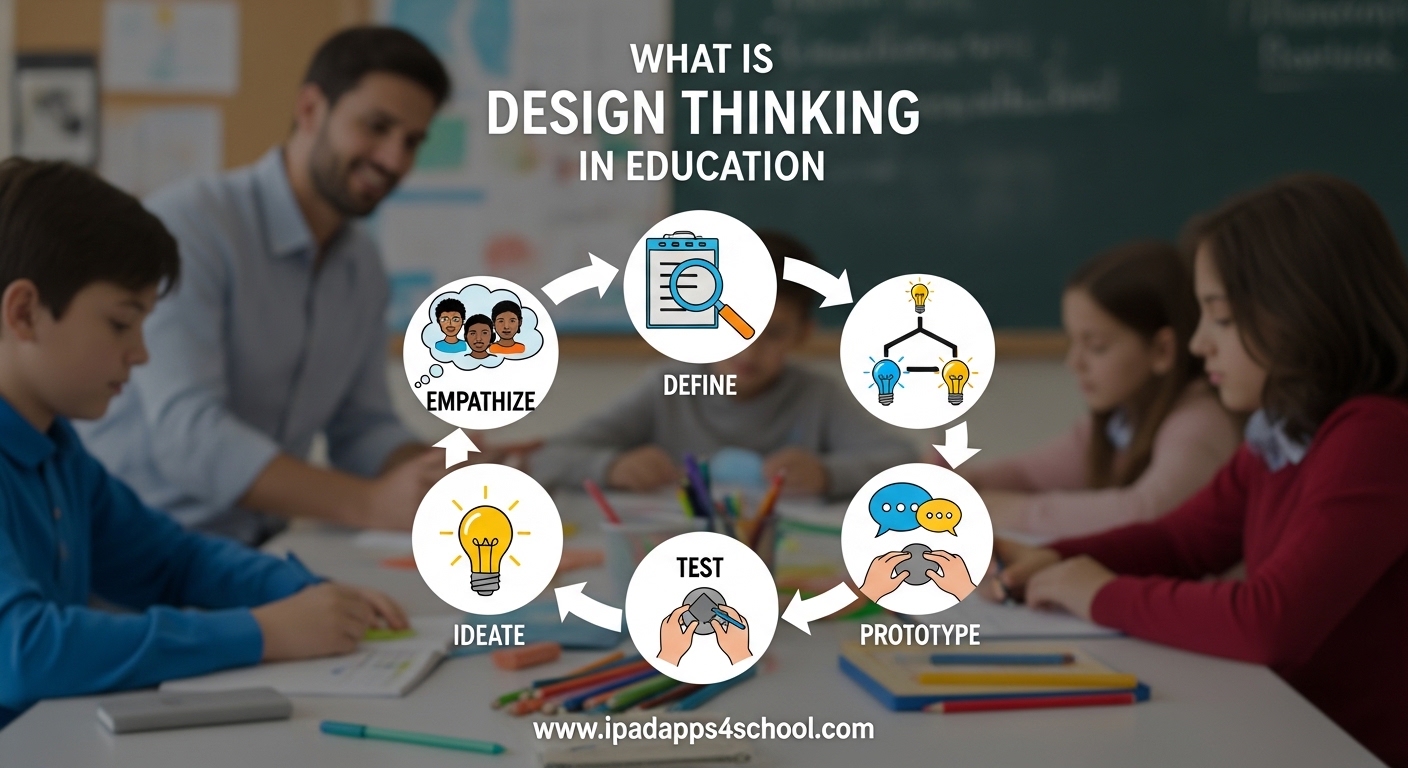
Design thinking in education transforms how students approach problems and develop creative solutions. As educators at iPadApps4School, we have seen firsthand how this human-centered framework helps students build critical thinking skills while working through real-world challenges. This guide explains what design thinking means in educational settings, breaks down the five stages with practical examples, and shows how iPad apps can support each phase of the process.
Whether you teach elementary students or high schoolers, understanding design thinking gives your learners tools they will carry far beyond the classroom. The approach develops empathy, encourages experimentation, and builds the creative confidence that students need for the future workforce. With the right iPad multitasking strategies, students can seamlessly move between research, creation, and collaboration apps during design thinking projects.
In this article, you will learn the complete design thinking framework, see how teachers across subjects implement it successfully, discover specific iPad apps for each stage, and get practical tips for starting your first design thinking project.
Table of Contents
What is Design Thinking in Education?
Design thinking in education is a human-centered, iterative problem-solving approach that emphasizes empathy, collaboration, and creativity. Unlike traditional teaching methods that focus on finding the single correct answer, design thinking encourages students to explore multiple solutions while deeply understanding the people affected by a problem.
Think of it as a mindset shift rather than just another teaching strategy. When students engage in design thinking, they become active problem solvers who interview real users, brainstorm wild ideas, build quick prototypes, and test their solutions with actual feedback. The process mirrors how professional designers, engineers, and entrepreneurs work in the real world.
The framework originated at Stanford University’s d.school and has since spread across educational institutions worldwide. Schools implementing design thinking report students developing stronger collaboration skills, greater creative confidence, and improved ability to tackle ambiguous problems. These outcomes align perfectly with the 4Cs of modern education: critical thinking, creativity, collaboration, and communication.
Design Thinking in Simple Terms
Design thinking means solving problems by first understanding the people involved, then creating and testing solutions until you find what works best. Imagine a student team redesigning the school cafeteria experience. Instead of immediately suggesting changes, they first watch students during lunch, interview them about frustrations, and identify the real problems. Then they brainstorm dozens of ideas, build simple models of the most promising ones, and test them with actual students before finalizing their recommendations.
This process feels natural because it mirrors how humans naturally solve complex problems. However, design thinking provides a structured framework that ensures students do not skip the crucial empathy phase or settle on the first idea that comes to mind.
Common Misconceptions About Design Thinking
Many educators mistakenly believe design thinking only applies to art or STEM subjects. In reality, the framework works equally well for humanities, social sciences, and interdisciplinary projects. A history class might use design thinking to create museum exhibits that engage younger students. A language arts class could apply it to redesign the school literary magazine.
Another misconception is that design thinking requires expensive materials or technology. While digital tools enhance the process, students can prototype with cardboard, paper, clay, or whatever materials are available. The thinking matters more than the materials.
Some teachers worry that design thinking takes too much time. While full design sprints can span weeks, you can introduce design thinking mindset through shorter activities. A single class period devoted to rapid prototyping or empathy interviews builds foundational skills without requiring curriculum overhauls.
The 5 Stages of Design Thinking
The design thinking process follows five distinct stages: Empathize, Define, Ideate, Prototype, and Test. While these stages appear linear, the process is actually iterative and non-linear. Teams frequently return to earlier stages based on what they learn during testing or ideation.
Stage 1: Empathize
Empathy forms the foundation of design thinking. In this stage, students set aside their own assumptions and seek to understand the people experiencing the problem. This involves observation, engagement, and immersion in the users’ experiences.
Students might conduct interviews with people affected by the problem, observe behaviors in natural settings, or even experience the situation themselves. For example, if redesigning the library experience, students would interview classmates about their library habits, watch how students currently use the space, and perhaps try using the library themselves from a new student’s perspective.
The goal is gathering rich qualitative data that reveals not just what people do, but why they do it. Students learn to ask open-ended questions, listen without judgment, and notice details that surface-level observation misses. This empathy work prevents students from designing solutions for problems that do not actually exist.
Stage 2: Define
After collecting empathy data, students synthesize their findings to identify the core problem. This Define stage transforms scattered observations into a clear, actionable problem statement called a Point of View (POV).
A strong POV statement follows this format: [User] needs to [user’s need] because [surprising insight]. For instance: “New students need a more welcoming library orientation because current tours make them feel like outsiders rather than valued community members.”
The Define stage requires students to analyze patterns in their empathy research, identify unexpected insights, and frame the problem in human-centered terms. This prevents solution-jumping and ensures the team addresses root causes rather than symptoms.
Stage 3: Ideate
With a clear problem statement, students move to ideation: generating as many solutions as possible. This stage emphasizes quantity over quality, encouraging wild ideas and deferring judgment. The goal is exploring the full possibility space before narrowing down.
Common ideation techniques include brainstorming, mind mapping, sketching, and “How Might We” questions. A team might ask: “How might we make new students feel welcomed in the library?” This framing invites possibility rather than constraint.
Students learn that their first ideas are rarely their best ideas. By pushing past obvious solutions to generate 50 or 100 concepts, teams discover unexpected approaches. They also practice building on others’ ideas rather than competing, developing essential collaboration skills.
Stage 4: Prototype
Prototyping turns abstract ideas into tangible representations. Students create quick, inexpensive versions of their solutions that users can interact with and react to. The key word is quick: prototypes should be rough enough that students feel comfortable discarding them based on feedback.
Prototypes can take many forms depending on the solution. For a redesigned library orientation, students might create a paper storyboard of the experience, a simple video walkthrough, or even role-play the interaction. Digital prototypes using presentation software or simple apps also work well.
This stage builds students’ creative confidence by lowering the stakes of creation. Because prototypes are explicitly experimental, students feel permission to try ambitious ideas and learn from failures. The focus shifts from making something perfect to making something that sparks useful feedback.
Stage 5: Test
Testing puts prototypes in front of real users and gathers feedback. Students observe how users interact with their solutions, ask clarifying questions, and note what works and what confuses. This feedback drives the next iteration of the design.
Testing often reveals that the team misunderstood the problem or that users need something different than expected. Rather than viewing this as failure, design thinking treats these moments as valuable learning that guides refinement. Teams might return to the Define stage with new insights or jump back to Ideate with fresh constraints.
Through multiple cycles of testing and refinement, solutions become increasingly user-centered. Students learn that great design emerges through iteration rather than upfront perfection. They also develop comfort with ambiguity and change, skills essential for navigating an unpredictable future.
Benefits of Design Thinking for Students
Design thinking develops capabilities that serve students throughout their academic and professional lives. Research shows that students who regularly engage with design thinking demonstrate improved problem-solving abilities, greater willingness to take creative risks, and stronger empathy skills.
Developing Critical Thinking
Design thinking requires students to analyze complex situations, synthesize diverse information, and evaluate multiple solutions against competing criteria. Rather than following predetermined steps to reach a known answer, students must think through ambiguous problems with no single correct solution.
This develops metacognitive awareness as students reflect on their own thinking processes. They learn to question assumptions, consider alternative perspectives, and justify their decisions with evidence. These critical thinking skills transfer across subjects and contexts.
Building Creative Confidence
Many students arrive in classrooms believing they are not creative. Design thinking dismantles this belief by treating creativity as a skill to develop rather than an innate talent. Through repeated cycles of ideation and prototyping, students discover that they can generate valuable ideas and bring them to life.
Stanford researchers call this “creative confidence”: the belief that you can create change in the world around you. Students with creative confidence approach challenges with optimism, persist through setbacks, and see constraints as opportunities for innovation rather than roadblocks.
Strengthening Collaboration
Design thinking is inherently collaborative. Teams must negotiate different viewpoints, build on each other’s ideas, and share responsibility for outcomes. Students practice giving and receiving constructive feedback, a skill many avoid but all need.
Working in diverse teams exposes students to different thinking styles and approaches. They learn that the best solutions often emerge from combining ideas rather than choosing one person’s approach. This prepares them for modern workplaces where cross-functional collaboration drives innovation.
Cultivating Empathy
The empathy stage develops perspective-taking abilities that extend beyond design projects. Students learn to genuinely understand experiences different from their own, recognizing that effective solutions must serve actual human needs rather than assumed preferences.
This empathy development has particular value in our increasingly polarized society. Students who practice design thinking become adults who listen before judging, ask questions before assuming, and seek to understand before seeking to convince.
Benefits of Design Thinking for Teachers
While students gain significant benefits, teachers also experience professional growth through design thinking implementation. The framework offers fresh approaches to persistent challenges and reinvigorates teaching practice.
New Approaches to Student Engagement
Design thinking addresses the engagement crisis many teachers face. When students work on problems they care about, with methods that feel relevant to their lives, motivation increases naturally. Teachers report that even struggling students become invested in design thinking projects.
The approach also provides natural differentiation. Advanced students can tackle complex iterations while others focus on core concepts. Because design thinking values diverse perspectives, every student has something unique to contribute regardless of traditional academic performance.
Curriculum Innovation
Design thinking invites teachers to reimagine their curriculum through a human-centered lens. Instead of asking “What content must I cover?” teachers ask “What problems do my students need to solve?” This shift often reveals opportunities for more meaningful learning experiences.
Many teachers discover that design thinking integrates naturally with existing standards. A science unit on ecosystems becomes a design challenge to protect local wildlife. A history lesson on industrialization transforms into redesigning the modern workplace. These connections make content more memorable and relevant.
Professional Growth
Implementing design thinking pushes teachers to develop new facilitation skills. Rather than delivering information, teachers guide inquiry, manage group dynamics, and provide timely feedback. Many educators find this shift professionally revitalizing after years of traditional instruction.
Teachers also benefit from joining the growing community of design thinking educators. Professional learning networks, conferences, and online resources provide ongoing support and inspiration. The mindset of continuous improvement that design thinking teaches students applies equally to teaching practice.
Design Thinking in the Classroom: Real Examples
Design thinking works across grade levels and subjects when adapted thoughtfully. Here are concrete examples from classrooms where teachers successfully implemented the framework.
Elementary: Redesigning the Playground
Fourth graders at a public school applied design thinking to improve their aging playground. Students began by interviewing younger students about what they liked and disliked about the current space. They observed during recess, noting which areas saw heavy use and which sat empty.
Through analysis, they defined the problem: “Young students need more imaginative play options because the current equipment limits creative engagement.” Students ideated solutions ranging from treehouse structures to musical installations. They prototyped their favorite concepts using cardboard and craft materials, then tested them by having kindergarteners interact with the models.
Based on feedback, the final design included a nature exploration zone, a performance stage area, and sensory paths. Students presented their recommendations to the school board, who approved funding for implementation.
Middle School: Sustainable City Design
Seventh grade science students tackled urban sustainability through a design thinking project. Working in teams, they selected real cities facing environmental challenges and redesigned them for carbon neutrality by 2050.
Students researched their chosen cities’ current infrastructure, interviewed residents about transportation habits, and analyzed climate data. They defined specific problems: “Phoenix residents need accessible cooling centers because extreme heat threatens vulnerable populations.”
Ideation produced concepts from underground transit networks to rooftop gardens. Teams built detailed scale models using recycled materials, then stress-tested their designs against climate projections. The project culminated in a city council simulation where students defended their proposals against budget and feasibility constraints.
High School: Community Health Initiative
High school biology classes partnered with local health clinics to address community wellness challenges. Each team selected a specific population, such as elderly residents or working parents, and designed health interventions.
Students conducted empathy interviews with community members and healthcare providers. They discovered that many residents knew what healthy behaviors looked like but faced barriers to implementation. This reframed the problem from education to accessibility.
Solutions included mobile health clinics, community garden networks, and peer support apps. Students prototyped their interventions through storyboards and pilot programs, gathering data on participation and outcomes. Several projects received actual funding from community health organizations.
Interdisciplinary: School Experience Redesign
An entire grade level participated in a year-long design thinking initiative to improve the school experience. Teachers across subjects coordinated so that design thinking activities reinforced curricular content while building toward a shared goal.
Language arts classes focused on interviewing skills and narrative analysis. Math classes addressed data collection and statistical analysis of survey results. Art classes supported prototyping and visual communication. Science classes explored relevant technical concepts.
The interdisciplinary approach demonstrated how design thinking connects learning across boundaries. Students saw how skills from different subjects combine to solve complex problems. Teachers reported unprecedented collaboration across departments.
iPad Apps That Support Each Design Thinking Stage
iPads offer powerful tools for each stage of the design thinking process. The portability, touchscreen interface, and app ecosystem make tablets ideal for creative collaboration. Here are specific apps that support design thinking workflows, organized by stage.
Empathize Stage Apps
The empathy stage requires capturing observations, recording interviews, and organizing insights. Voice Memos or GarageBand work well for interview recording. Notes or Notability allow students to type or handwrite observation notes while moving around. Photos and videos captured in the Camera app document behaviors and environments.
For organizing empathy data, Miro or Milanote provide digital whiteboards where teams can cluster observations and identify patterns. These apps sync across devices, allowing students to contribute insights from their individual iPads while building shared understanding.
Define Stage Apps
Defining the problem requires synthesizing research into clear statements. MindNode or XMind help students map connections between observations and identify root causes. These mind mapping apps make the synthesis process visible and collaborative.
Pages or Google Docs work well for drafting and refining Point of View statements. Students can comment on each other’s drafts, suggesting clearer language or challenging assumptions. The revision history shows how the problem definition evolved.
Ideate Stage Apps
Ideation benefits from apps that support rapid visual thinking. Procreate or Tayasui Sketches enable quick sketching of concepts. Freeform, Apple’s collaborative whiteboard app, lets teams brainstorm together in real time, adding sticky notes, drawings, and images.
Concepts provides infinite canvas sketching with layers and flexible organization. This works well for divergent brainstorming where students generate many ideas before clustering them into themes. Using iPad multitasking for design thinking projects, students can have their whiteboard open alongside research or inspiration images.
Prototype Stage Apps
Digital prototyping tools let students create interactive mockups without physical materials. Keynote or Canva work well for presentation prototypes. Swift Playgrounds or ScratchJr enable simple app prototypes for younger students. For more advanced projects, Figma or Adobe XD offer professional-grade prototyping capabilities.
Stop Motion Studio or iMovie support video prototypes showing how an experience might unfold. Clips works well for quick video explanations of physical prototypes built with traditional materials.
Test Stage Apps
Testing requires gathering structured feedback. Google Forms or Microsoft Forms let students create surveys for users to complete after interacting with prototypes. Numbers or Excel help analyze feedback data and identify patterns.
Flipgrid enables users to record video feedback, capturing reactions that written surveys miss. Students can review these videos as a team, noting facial expressions and tone that reveal user experience issues. Padlet provides a simple way to collect post-testing reflections from multiple users in one shared space.
How to Get Started with Design Thinking?
Starting design thinking in your classroom does not require complete curriculum overhaul. Small steps build confidence and skills for both you and your students.
Begin with a Mini Challenge
Try a one-hour design sprint to introduce the framework. Challenge students to redesign the morning arrival experience or create a better system for classroom supplies. Keep the scope small so students experience the full cycle without overwhelming complexity.
Focus on process over product at first. Celebrate the iteration, not just the final solution. Debrief explicitly about what felt different from traditional assignments and what students learned about problem-solving.
Choose Relevant Problems
Students engage most deeply with problems that affect their own lives or communities. Look for challenges within your school: cafeteria experiences, playground design, library organization, or hallway traffic flow. These provide authentic contexts while keeping logistics manageable.
As you and your students gain experience, expand to community problems, global challenges, or curriculum-connected design briefs. The key is ensuring students genuinely care about the outcome.
Build Assessment Strategies
Assessment poses the most common challenge for design thinking implementation. Traditional rubrics focused on correct answers do not fit. Instead, assess the process: quality of empathy research, creativity of ideation, willingness to iterate based on feedback, and collaboration skills.
Many teachers use process portfolios where students document their thinking at each stage. Peer feedback protocols develop students’ ability to give and receive constructive criticism. Self-assessment rubrics help students reflect on their own growth as designers.
Avoid Common Pitfalls
The most common mistake is rushing to solutions before building empathy. When students immediately start proposing ideas, redirect them back to user research. Remind them that great solutions require understanding actual needs.
Another pitfall is perfectionism in prototyping. Encourage rough, quick prototypes explicitly. Set time limits that force speed over polish. Remind students that prototypes are meant to be tested and changed.
Finally, avoid treating design thinking as a one-time activity. The framework delivers greatest value when used repeatedly, allowing students to develop fluency with each stage.
Frequently Asked Questions
What are the 5 stages of design thinking in education?
The 5 stages of design thinking in education are: 1) Empathize – understanding user needs through observation and interviews, 2) Define – framing the problem based on research insights, 3) Ideate – generating many possible solutions, 4) Prototype – creating quick tangible representations of ideas, and 5) Test – gathering feedback and iterating. These stages are iterative rather than linear.
What is the meaning of design thinking in education?
Design thinking in education is a human-centered problem-solving framework that teaches students to understand user needs before developing solutions. It emphasizes empathy, collaboration, creativity, and iteration. Students learn to tackle complex, real-world problems without single correct answers while building skills in critical thinking, communication, and creative confidence.
What is design thinking in simple words?
Design thinking means solving problems by first understanding the people involved, then creating and testing solutions until you find what works best. It is a structured approach to creative problem-solving that anyone can learn. Students observe users, identify problems, brainstorm ideas, build simple versions of solutions, and improve based on feedback.
What are the 5 principles of design thinking?
The 5 core principles of design thinking are: 1) Human-centered – focusing on actual user needs, 2) Collaborative – working in diverse teams, 3) Experimental – trying ideas through prototyping, 4) Optimistic – believing solutions exist, and 5) Iterative – improving through cycles of testing and refinement. These principles guide how teams approach challenges throughout the process.
Is design thinking only for STEM subjects?
No, design thinking works across all subjects. History students might design museum exhibits that engage younger learners. Language arts students could redesign the school literary magazine. Art students might create public installations. The framework adapts to any discipline where students solve problems for real users.
How long does a design thinking project take?
Design thinking projects range from one-hour mini-challenges to semester-long initiatives. Quick sprints introduce the framework and build basic skills. Deeper projects allow more thorough research, multiple iteration cycles, and polished solutions. Start small and expand as you and your students gain experience.
How do you assess design thinking projects?
Assessment should focus on process quality rather than final product perfection. Evaluate the depth of empathy research, creativity in ideation, willingness to iterate based on feedback, and collaboration skills. Use process portfolios, peer feedback protocols, and self-assessment rubrics rather than traditional answer-focused grading.
Can design thinking work in traditional school environments?
Yes, design thinking adapts to various school contexts including those with standardized testing requirements. Teachers integrate design thinking alongside curriculum standards rather than replacing them. Short activities build skills without requiring curriculum overhaul. The mindset and skills developed support academic learning across subjects.
Conclusion
Design thinking in education offers a powerful framework for developing the problem-solving skills students need for an unpredictable future. By emphasizing empathy, creativity, and iteration, the approach prepares learners to tackle complex challenges in school and beyond.
The five stages provide a structured yet flexible process that works across subjects and grade levels. Whether you teach kindergarten or high school, design thinking helps students develop creative confidence while building essential collaboration and critical thinking skills.
Start small with a mini design challenge, then expand as you and your students grow comfortable with the process. Remember that design thinking is as much about the mindset as the methodology. When students learn to understand problems deeply before jumping to solutions, they develop capabilities that serve them throughout their lives.
With iPad apps supporting each stage of the process, integrating design thinking into your classroom has never been more accessible. The combination of human-centered methodology and digital tools creates powerful learning experiences that prepare students for whatever challenges await in 2026 and beyond.